CMS is the Product: Why Your Signage Is Only as Good as Your Software
When most operators evaluate digital signage, they spend the majority of their time on hardware. Screen size, brightness, resolution, bezel width, mounting options. These are the tangible, comparable specifications — easy to put in a spreadsheet, easy to get quotes on, easy to debate in a procurement meeting.
The content management system gets a paragraph in the proposal. Maybe a demo. Usually a checkbox: “cloud-based CMS included.”
This is the wrong way around.
The screen is infrastructure. Once it’s mounted and working, your interaction with it is essentially zero. The CMS is the system you will use every week — sometimes every day — for the entire operational life of the deployment. It determines whether your signage is a live commercial asset or an expensive static display. And it’s the part most buyers evaluate least carefully.
What a CMS Actually Does
At its simplest, a content management system for digital signage does three things: stores content, schedules when it plays, and pushes it to the right screens.
That description, however, covers a wide range from “barely functional” to “genuinely powerful.” The difference matters enormously in practice.
A minimal CMS lets you upload a file and send it to a screen. You log in, browse to a file, select a screen, press publish. The file plays. That’s it.
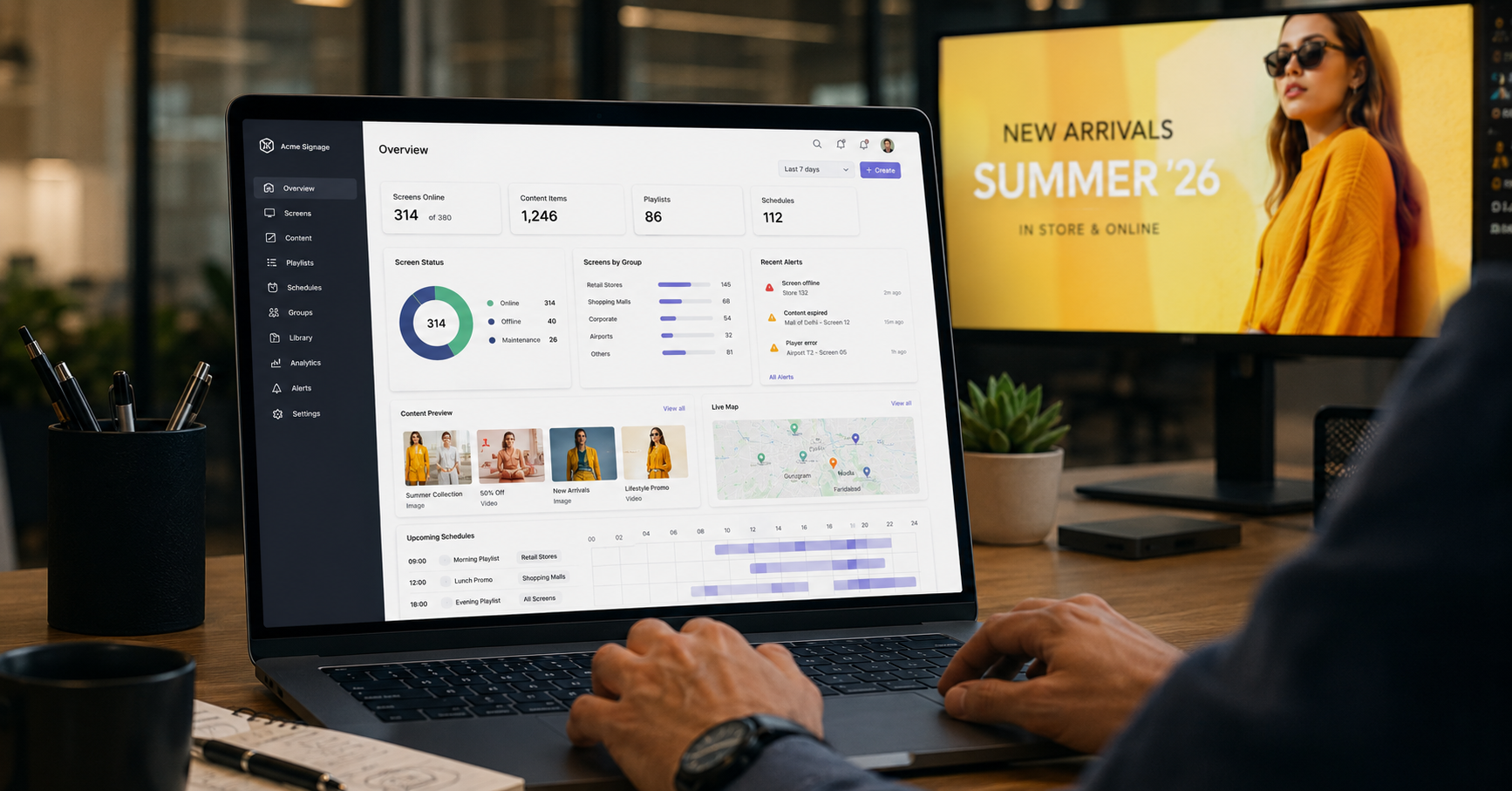
A capable CMS lets you build a playlist with precise scheduling — this content runs Monday to Friday, 9 AM to 12 PM; this different content runs on weekends; this third version runs during the 5–8 PM daypart. It lets you group screens by location, by type, by outlet — so a single action updates all your Delhi stores without touching your Mumbai ones. It lets you set expiry dates on content, so a Diwali campaign stops playing on November 3rd automatically, without anyone logging in to remove it. It generates playback reports so you can verify that a campaign actually ran on the screens it was supposed to, at the times it was scheduled.
These are not exotic features. They are the baseline of what a professionally deployed signage network requires. And yet, a surprising number of deployments run on systems that don’t provide them.
The Hidden Cost of a Weak CMS
The consequences of an underpowered CMS are felt gradually, not immediately. In the first few weeks after installation, when content is fresh and the team is engaged, it doesn’t matter much. The problems surface later.
Version drift. Without centralised control and reliable push capability, content across a multi-outlet network starts to diverge. Outlet A is running the current campaign. Outlet B is still on last month’s. Outlet C has a screen that hasn’t been updated in six weeks because the local manager doesn’t have login access and the request is sitting in someone’s inbox. Brand consistency — one of the core arguments for digital over print — quietly disappears.
Expired content. A limited-time offer that runs past its window. A price that changed last week still showing on the board. A product that’s been discontinued still being promoted. Every one of these is a customer experience failure, and most of them happen because someone had to manually remove content and didn’t.
Update fatigue. If updating the CMS is cumbersome — slow interface, unintuitive navigation, requiring technical knowledge to perform basic tasks — the marketing or operations team stops doing it regularly. The screens get updated quarterly instead of weekly. Content becomes stale. The investment underperforms. The business concludes that “digital signage didn’t really work” — when the actual problem was the software.
What to Evaluate in a CMS
When assessing a signage CMS — whether it comes bundled with hardware or as a standalone platform — these are the capabilities that actually determine day-to-day usability:
Content scheduling granularity. Can you schedule by time of day, day of week, and date range — independently and in combination? Can you set content to auto-expire? Dayparting and automated expiry are not advanced features; they’re the minimum for a professionally managed network.
Multi-screen and multi-location grouping. Can you define screen groups — by outlet, by city, by screen type — and push content to groups rather than individual screens? For any operator running more than three outlets, screen-by-screen management is not sustainable.
Role-based access. Can you give a store manager access to update content for their outlet only, without exposing the entire network? Can HQ maintain override control while allowing local customisation within defined limits? This matters for franchise networks where central control and local relevance need to coexist.
Offline resilience. What happens when a screen loses internet connectivity? Does it go blank, loop the last content, or fail? A well-designed system caches content locally and continues playing until connectivity is restored. This is critical for outlets in locations where connectivity is intermittent.
Playback verification. Can you confirm that a campaign actually ran — on which screens, during which time windows? This is the basic accountability that any professionally managed media investment requires, and it’s absent from many entry-level systems.
Integration readiness. Can the CMS pull data from external sources — pricing feeds, inventory systems, weather, time-based triggers — to make content dynamic? This is not a day-one requirement for most operators, but knowing the system can grow in this direction matters when planning a multi-year deployment.
Lite vs. Pro: Matching CMS Capability to Business Scale
Not every operation needs the same level of CMS sophistication, and there’s no value in paying for capabilities you won’t use.
For a single-outlet operator or a boutique brand running two or three locations, a Lite-tier CMS — straightforward scheduling, basic grouping, simple interface — is typically sufficient. The priority is ease of use and low maintenance overhead. If the marketing team can manage content without training or technical support, the system is doing its job.
For a multi-city franchise operator, a growing QSR chain, or any brand where content strategy is centralised but delivery is distributed, a Pro-tier platform is where the return actually materialises. Granular scheduling, role-based access, playback reporting, and integration capability are what make the difference between a signage network that operates like a managed media channel and one that operates like a collection of individual screens.
The mistake is applying a Lite-tier system to a Pro-tier operation — buying cheap software to run expensive hardware across a large network, and then wondering why the outcomes don’t match the investment.
The Right Question to Ask
The next time you’re evaluating a digital signage proposal, after you’ve reviewed the hardware specifications, ask the vendor this: “Can you show me, live, how I would update content across all my outlets at once — and how I would confirm that the update ran correctly?”
Watch what happens. A vendor with a capable CMS will show you in two minutes. A vendor with a weak one will redirect the conversation to the screen specs.
The screen is what you see. The CMS is what you get.
If you’re evaluating CMS options for a new deployment or reconsidering a system that isn’t keeping pace with your operations, we’d be glad to show you how xtravu DSS handles these requirements in practice.
Get in touch: contact@techworksworld.com | +91-99109 65918 | techworksworld.com