
Best Digital Display Solutions for Healthcare Facilities
Healthcare facilities have a more complex set of display requirements than almost any other environment. Patient-facing communication, clinical operations, wayfinding, administrative efficiency, and regulatory compliance all place demands on display technology simultaneously, and the consequences of getting it wrong (misinformation in a clinical setting, a display that causes distraction in a sensitive area, a wayfinding system that fails when a patient needs it most) are more serious than in most commercial contexts.
This guide covers the display formats that work in healthcare environments, what each one is best suited for, and the considerations that distinguish a well-planned healthcare deployment from a generic commercial signage installation in a medical setting.
The Display Formats Worth Considering for Healthcare
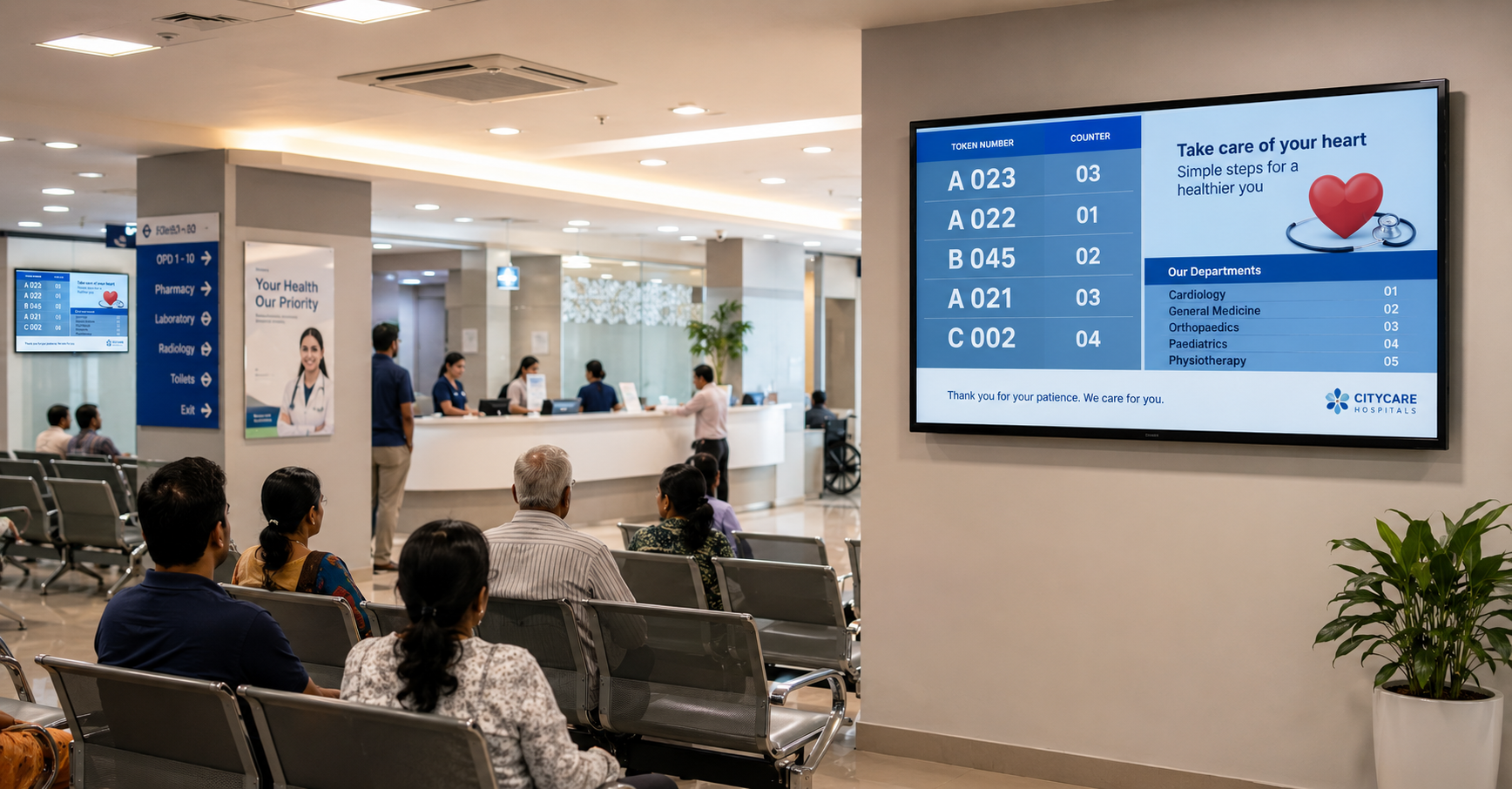
1. Queue Management Displays
What they are: Screens connected to a token or queue management system, showing current call numbers, counter assignments, and estimated wait information in patient waiting areas.
What they do best: Reducing perceived wait time by giving patients visible, accurate information about their position in the queue. Research consistently shows that informed waiting, knowing you are third in line and the doctor is running ten minutes late, is experienced as significantly less stressful than uninformed waiting, even when the actual wait time is identical.
Key specification considerations for healthcare:
- Visibility from seating: The display needs to be legible from the furthest seating position in the waiting area, not just from directly in front of it. Viewing distance and minimum text size need to be calculated for the specific room dimensions.
- Audio announcement integration: Many queue management systems pair visual displays with audio announcements, calling a token number aloud in addition to showing it on screen. This is important for patients with visual impairments or those who may not be watching the display continuously.
- Multilingual display: In facilities serving linguistically diverse populations, the ability to show token calls and instructions in multiple languages simultaneously, or alternating, is a meaningful accessibility feature.
Best for: OPD waiting areas, diagnostic centre reception, pharmacy waiting areas, hospital registration counters, specialist clinic queues.
2. Patient Information and Health Education Displays
What they are: Medium to large-format screens, typically 43 to 65 inches, in waiting areas, showing health education content, facility information, and administrative guidance.
What they do best: Using dwell time constructively. A patient waiting 30 to 45 minutes in an OPD is an audience with time and, in a healthcare context, genuine motivation to engage with health-relevant content. Condition-specific education, preventive care guidance, post-procedure instructions, facility navigation, insurance process information, all of this can be delivered in the waiting room in ways that reduce downstream consultation time and administrative friction.
Key specification considerations for healthcare:
- Content governance: Health information displays carry implicit clinical authority. Content needs to be reviewed and approved by clinical or medical affairs teams, not just marketing. The CMS should support a content approval workflow that requires sign-off before content goes live.
- Content sensitivity: Waiting areas in oncology, mental health, or maternity departments require content calibrated to the emotional state of patients in those specific areas. A generic brand-and-health-tips loop is not appropriate across all departments.
- Screen placement: Displays should not be positioned so that patients in sensitive consultations or procedures areas are visible from the waiting room. Privacy screens and thoughtful placement are part of the installation brief, not afterthoughts.
Best for: All outpatient waiting areas, diagnostic reception areas, pharmacy waiting zones, admission lounges.
3. Digital Wayfinding Displays and Interactive Directories
What they are: Non-interactive or touchscreen displays at building entrances, elevator banks, and key junctions, showing floor maps, department directories, and directional guidance.
What they do best: Reducing navigation confusion for patients, visitors, and delivery staff in multi-floor or multi-building healthcare facilities. In large hospitals where patients may be navigating between OPD registration, consultation, diagnostics, and pharmacy, sometimes across different wings or buildings, clear, current wayfinding reduces anxiety and reduces the volume of navigation queries handled by reception and security staff.
Key specification considerations for healthcare:
- Update responsiveness: Departments relocate, temporary clinics open, renovation-related closures occur. Digital wayfinding that can be updated centrally within hours is significantly more reliable than static maps reprinted annually.
- Accessibility: Interactive directories need large touch targets, high-contrast text, and where possible, audio guidance options for visually impaired users.
- Emergency mode: Some healthcare wayfinding systems support an emergency override that displays evacuation routes and muster points on all wayfinding screens simultaneously. This is worth specifying for large facilities.
Best for: Hospital main entrances, multi-floor reception lobbies, inter-building junctions, large diagnostic centre complexes.
4. Clinical and Operational Displays
What they are: Back-of-house or staff-facing displays used for operational coordination rather than patient communication. Includes OT scheduling boards, ward status displays, nurse station screens, and emergency department status boards.
What they do best: Replacing paper-based and verbal coordination systems with a shared visual display of operational status, bed availability, procedure schedules, patient queues, maintenance alerts. For clinical teams working in fast-moving environments, a shared visual reference reduces the coordination overhead that comes from relying on verbal handoffs, clipboards, and printed schedules.
Key specification considerations for healthcare:
- Data integration: Clinical operational displays are most valuable when they show live data from existing hospital information systems, HIS, EMR, scheduling platforms, rather than manually updated content. The integration between the display system and existing clinical data sources is the most technically complex aspect of these deployments and needs to be scoped carefully.
- Access control: Clinical data displayed on ward or nurse station screens should not be visible to patients or visitors. Placement, orientation, and privacy screen options need to be specified with this in mind.
- Hardware for clinical environments: Screens in clinical areas need to be cleanable with standard hospital disinfectants without damage to the display surface. This is a specification requirement worth confirming explicitly with the hardware vendor.
Best for: Surgical suites and OT corridors, ward nurse stations, ICU coordination areas, emergency departments, inpatient admission areas.
5. Digital Signage for Pharmacy and Diagnostic Areas
What they are: Displays in pharmacy waiting areas showing token queues, preparation status, and medication information; displays in diagnostic areas showing preparation instructions, wait times, and reporting timelines.
What they do best: Managing the specific communication needs of high-volume, process-driven sub-departments. Pharmacy queues and diagnostic waiting areas have their own patient flow and information requirements that differ from general OPD waiting, longer, more process-dependent waits with specific procedural information that patients need before their service interaction.
Best for: In-house hospital pharmacies, standalone pharmacy retail outlets, diagnostic centre waiting areas, radiology and pathology reception.
The Considerations That Distinguish Healthcare Deployments
Regulatory and Content Governance
Healthcare is one of the few environments where display content can carry genuine regulatory implications. Drug promotions, treatment claims, and certain categories of health information may be subject to guidelines from the Medical Council of India, the CDSCO, or institutional ethics committees.
The CMS used for a healthcare deployment should support:
- Role-based content creation and approval, clinical content reviewed by clinical staff before going live
- Content version history, an audit trail of what was shown, when, and who approved it
- Automated expiry, content that is time-limited (a visiting specialist schedule, a temporary clinic notice) should expire automatically rather than requiring manual removal
Privacy and Patient Dignity
Display content and placement in healthcare settings must account for patient privacy in ways that don’t apply in commercial environments. Screens should not display patient names, token numbers that could be associated with a specific condition, or any content that could inadvertently identify or embarrass a patient. Queue systems that use abstract token numbers rather than names are standard for this reason.
Hardware Durability and Cleanability
Healthcare environments are cleaned frequently and with disinfectants that damage standard commercial display surfaces over time. Hardware specified for healthcare settings should have surfaces rated for hospital-grade cleaning agents. This is worth confirming explicitly, it is not a universal standard for commercial displays.
Uninterrupted Operation
In clinical and operational display contexts, screen downtime is more consequential than in commercial environments. An OT scheduling board that goes dark during a surgical day, or a ward status display that fails during a shift change, creates operational disruption with patient safety implications. Service SLAs for healthcare deployments should reflect this, shorter response times, higher uptime commitments, and where appropriate, hardware redundancy planning.
The Configuration That Works for Most Healthcare Facilities
For a standalone clinic or single-speciality centre:
- Queue management display in the waiting area
- Patient information display showing health education and facility information
- Counter-top display at the billing and pharmacy counter
For a multi-speciality hospital or large diagnostic chain:
- Queue management displays in each OPD and diagnostic waiting area
- Patient information displays in all major waiting areas
- Digital wayfinding at the main entrance, elevator banks, and key junctions
- Clinical operational displays at ward nurse stations and OT corridors
- All managed from a central CMS with department-level access control and content approval workflows
If you’re planning a digital display deployment for a healthcare facility, whether a single clinic or a multi-building hospital campus, we’d be glad to walk through what a phased, appropriately specified rollout looks like for your specific environment.
Get in touch: contact@techworksworld.com | +91-99109 65918 | techworksworld.com
