
Which Digital Display Solutions Work Best for Educational Institutions?
Educational institutions have a communication problem that gets more complex as they grow. A school with 800 students, a college with 5,000, a university with 30,000 across multiple campuses, each has hundreds of announcements, timetable changes, event notifications, and administrative updates that need to reach the right people at the right time, in environments where email is ignored, WhatsApp groups are noisy, and notice boards are buried under layers of outdated printouts.
Digital display solutions for educational institutions aren’t about replacing classrooms with screens. They’re about solving a specific infrastructure problem: how do you move time-sensitive, high-volume information reliably through a large, distributed, high-footfall environment, and keep it current without requiring a dedicated team to manage it manually?
This guide covers the formats that work, the applications they’re suited to, and the considerations that matter when specifying a display deployment for a school, college, or university.
The Display Formats That Work in Educational Environments
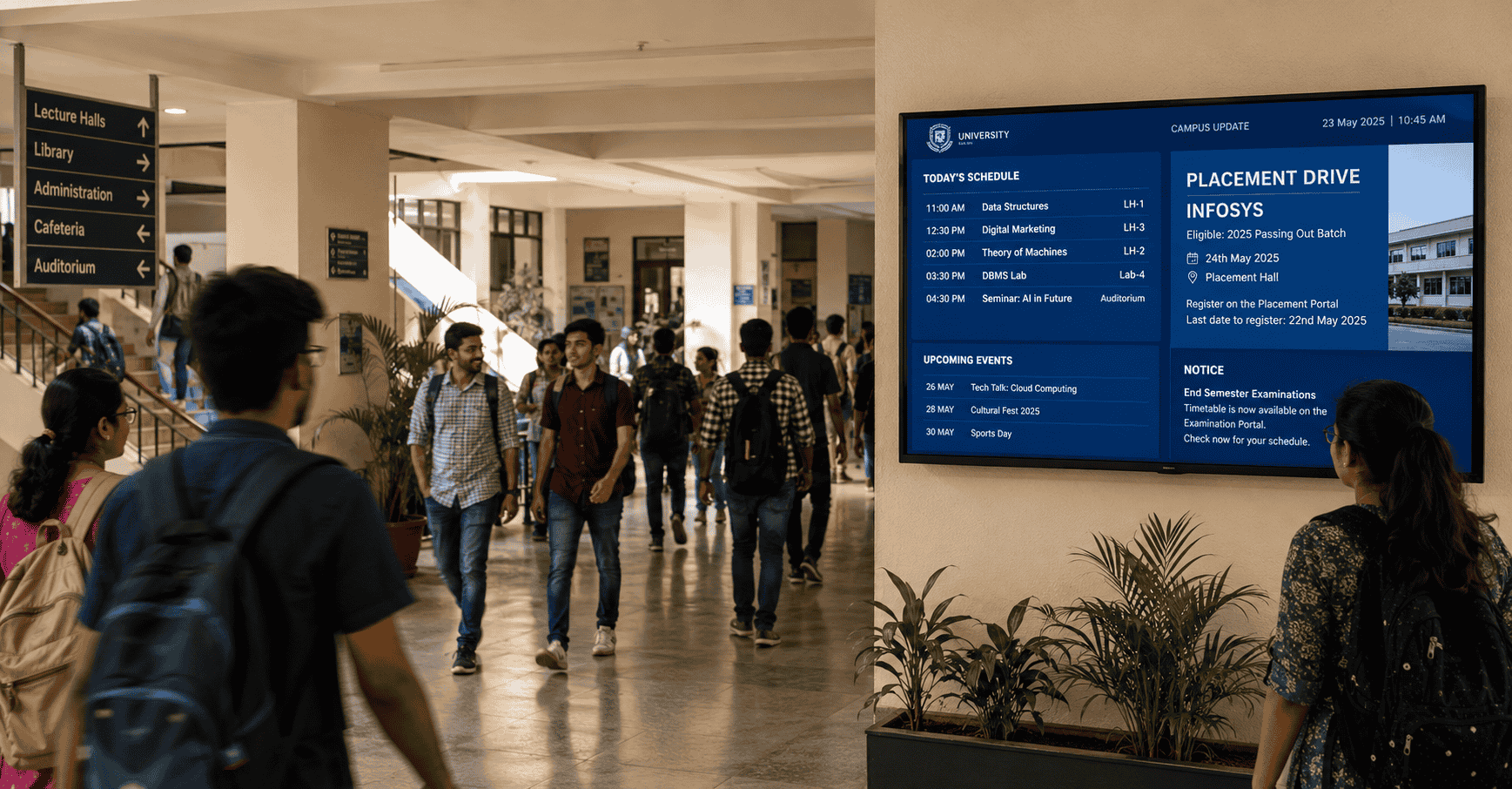
1. Corridor and Common Area Displays
What they are: Medium to large-format screens, typically 43 to 65 inches, mounted in high-footfall corridors, building entrances, canteen areas, and common rooms, showing announcements, event information, timetable updates, and institutional communication.
What they do best: Reaching students and staff where they already are, with information that’s current and relevant to what’s happening today. A display outside the main lecture hall block showing today’s schedule changes reaches every student who passes it, without depending on anyone checking a phone, a portal, or a notice board.
Key specification considerations for education:
- Mounting height and angle: Corridor displays need to be visible to students walking at pace, not just to those who stop in front of them. Viewing angle and mounting height need to be calibrated to the corridor width and typical approach distance.
- Vandal resistance: In student-heavy environments, displays in accessible locations benefit from toughened glass fronts and robust enclosures, particularly for ground-floor or accessible-height installations.
- Content scheduling: The most valuable content in an educational corridor display is the most time-sensitive, today’s schedule changes, this week’s events, tomorrow’s deadlines. The CMS needs to make these updates quick enough that the team responsible for them actually does it daily, not weekly.
Best for: Main building entrances, primary corridor junctions, canteen and dining areas, hostel common rooms, library entrances.
2. Classroom and Department Entrance Displays
What they are: Small-format screens, typically 21 to 32 inches, mounted outside lecture halls, seminar rooms, and department offices, showing the current day’s schedule for that specific room.
What they do best: Eliminating the most common source of student confusion on a large campus, finding out that a class has been moved, a room has changed, or a session has been cancelled, at the moment of arrival rather than after walking across campus. When connected to the institution’s timetable system, these displays update automatically whenever a schedule change is logged, no manual update required.
Key specification considerations for education:
- Timetable integration: The value of classroom entrance displays is almost entirely dependent on integration with the timetable management system. A display showing manually entered schedules that may or may not be current is only marginally better than a printed timetable. Automatic sync with the live timetable system is the requirement.
- Power and cabling: Outside every lecture hall and seminar room implies significant cabling runs. This needs to be planned during the site assessment, surface-mounted conduit, trunking, or in-wall cabling depending on the building construction and available access.
- Slim form factor: Displays mounted outside room doors need to be proportionate to the door surround, a 55-inch screen outside a standard door reads as incongruous. 21 to 32 inches is the appropriate range for most classroom entrance applications.
Best for: Lecture halls, seminar rooms, department offices, laboratory entrances, multi-purpose room doors.
3. Digital Wayfinding and Campus Directories
What they are: Touchscreen or non-interactive displays at campus entry points and key junctions, showing building maps, department locations, and directional guidance.
What they do best: Helping the people who need it most, new students in their first weeks, parents visiting on admission day, external recruiters for placement drives, visiting faculty, delivery staff, navigate a campus that regular students and staff have internalised to the point of invisibility.
Key specification considerations for education:
- Searchable directory: A touchscreen campus directory that allows visitors to search for a department, faculty member, or facility by name, and receive step-by-step directions, is significantly more useful than a static floor map on a screen.
- Update responsiveness: Campus layouts change. New buildings open, departments relocate, facilities are renamed. A wayfinding system that can be updated centrally without technical intervention keeps the directory accurate without depending on anyone remembering to request an update.
- Outdoor considerations: For campuses where the main entry point is outdoors or under a canopy, outdoor-rated hardware with appropriate brightness and weatherproofing is required.
Best for: Campus main gates, reception lobbies, multi-building complexes, universities with international student populations, campuses with frequent visitor traffic.
4. Placement and Career Services Displays
What they are: Dedicated screens in placement cell areas, canteen zones, and high-traffic student corridors, showing placement-specific content, company visit schedules, pre-placement talk timings, registration deadlines, and offer announcements.
What they do best: Keeping placement activity continuously visible to the student population without competing with every other announcement in a WhatsApp group or email thread. For institutions where placement outcomes are a significant part of the brand proposition, a dedicated placement communication channel, always-visible, always current, keeps students engaged with the placement process throughout the academic year.
Key specification considerations for education:
- Access control: Placement cell staff should be able to update placement displays without IT involvement, from a browser, within minutes. The CMS access model needs to give the placement team autonomy over their screens without exposing the full network to non-technical users.
- Content library: Placement content follows a predictable annual cycle, company announcement, pre-placement talk, registration deadline, interview schedule, offer disclosure. Building a content template library for these recurring formats reduces the production effort for the placement team significantly.
Best for: Placement cell notice areas, canteen screens in engineering and management colleges, corridor displays in proximity to placement-heavy departments.
5. Administrative and Visitor Area Displays
What they are: Screens in the administrative block, registrar’s office, and admission areas, showing queue status, process guidance, document checklists, and counter assignments.
What they do best: Reducing the volume of repetitive queries handled by administrative staff, particularly during peak periods, admission season, examination registration, fee payment windows. A display showing “Documents required for admission: 10th marksheet, 12th marksheet, Aadhaar, passport photo, transfer certificate” reduces the number of times a staff member has to answer the same question verbally.
Best for: Administrative block reception, registrar’s office, admission inquiry areas, examination control rooms during result season.
6. Student Body and Cultural Event Displays
What they are: Screens in common areas with role-based access for student bodies, cultural committees, and sports departments to publish approved content, event posters, results, club announcements, cultural programme schedules.
What they do best: Giving student organisations a formal, visible communication channel without depending on physical notice board space or requiring IT involvement every time an announcement needs to go up. With appropriate access controls, the student council can update their screens without affecting the institutional communication on other screens in the network.
Best for: Common rooms, canteen areas, sports complex notice areas, hostel lobbies.
The CMS Requirements for Educational Deployments
Educational institutions have a specific CMS requirement that differs from most commercial deployments: distributed access with centralised control.
Multiple teams, academic administration, placement cell, student union, departments, facilities, each need to manage their own content on their own screens, without being able to interfere with content on screens they don’t own. At the same time, the central administration needs the ability to push institution-wide announcements to every screen simultaneously, an examination schedule change, a holiday declaration, an emergency notification.
The CMS needs to support:
- Role-based access at the screen group level, each team manages their screens, not the full network
- Central override capability, administration can push to all screens when needed
- Timetable system integration, for automatic classroom schedule updates
- Simple enough interface for non-technical users, placement officers, student council members, department coordinators should be able to update content without training beyond an initial orientation session
- Content approval workflows for sensitive or institution-wide content
The Configuration That Works for Most Educational Institutions
For a single-campus school or smaller college:
- Corridor displays at main entrance and key common areas
- Administrative area displays for queue and process communication
- Managed from a single CMS with two or three access levels
For a large college or single-campus university:
- Corridor and common area displays across all major buildings
- Classroom entrance displays connected to the timetable system
- Campus directory at main entry points
- Placement-specific screens in high-student-traffic areas
- Administrative area displays
- Student body access for designated common area screens
- Managed from a CMS with department-level access groups and central override
For a multi-campus university or educational group:
- All of the above per campus
- Centralised CMS with campus-level management groups and group-wide override capability
- Standardised content templates across campuses for institutional communication, with local customisation within defined parameters
If you’re planning a digital display rollout for an educational institution, whether a single-building school or a multi-campus university, we’d be glad to walk through what a practical, phased deployment looks like for your specific environment and budget.
Get in touch: contact@techworksworld.com | +91-99109 65918 | techworksworld.com
